About Winter x50
Winter x50 — a new Lineage 2 High Five server with unique mechanics, epic battles and competitive gameplay. Opening in October 2026.
Launch Date: 16 October 2026 · Status: Open beta, preparing for server launch
Rates:
EXP/SP – x50
Adena - x8
Drop - x5
Spoil x10
Quest - x1
Basics
Full buffs, auto loot, and automatic learning of all skills without books. Number of buff slots: 32/14
All class changes and subclasses are available for free, without completing quests
Auto farming 24 hours a day with a Premium Account (only one game window by default, but 2 more can be purchased in Services)
Maximum number of game windows per PC - 3
Two new locations have been added: Tantar and Khashi Sawmill (both solo and party spots are available)
New world epic bosses are available: Zaken, Frintezza, B. Freya
Morvein's quest chain has been added to guide you from level 1 to 85 and provide good rewards
Features
Gear Score system
An overall measure of your character's strength, calculated from equipped items. This value is also used to balance event teams, assigning players to opposing sides according to their GS.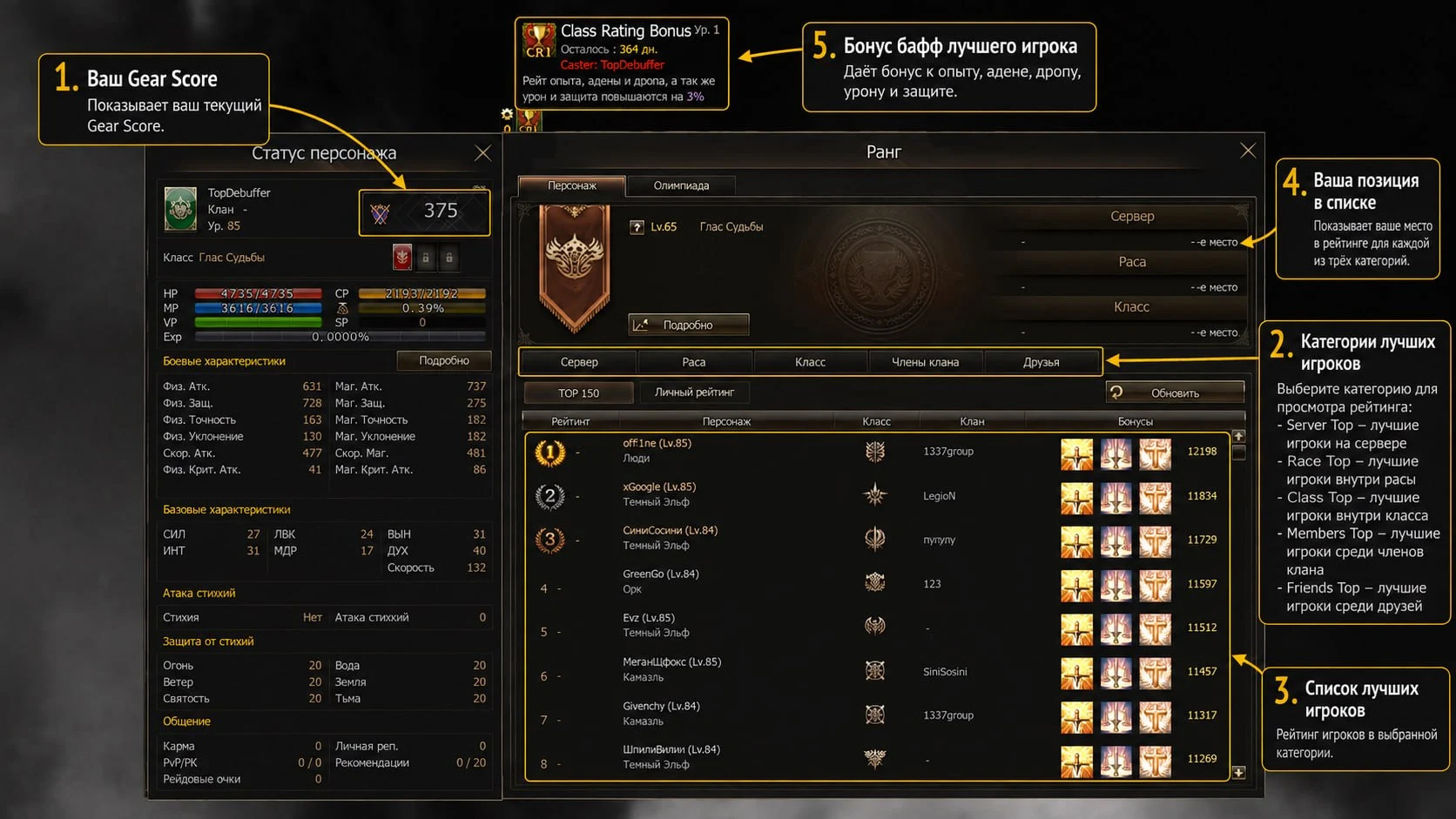
Bonus buff in each category:
Server rank 1 - experience, Adena, drop rates, PVP/PVE damage and defense increase by 7%
Race rank 1 - experience, Adena, drop rates, PVP/PVE damage and defense increase by 5%
Class rank 1 - experience, Adena, drop rates, PVP/PVE damage and defense increase by 3%
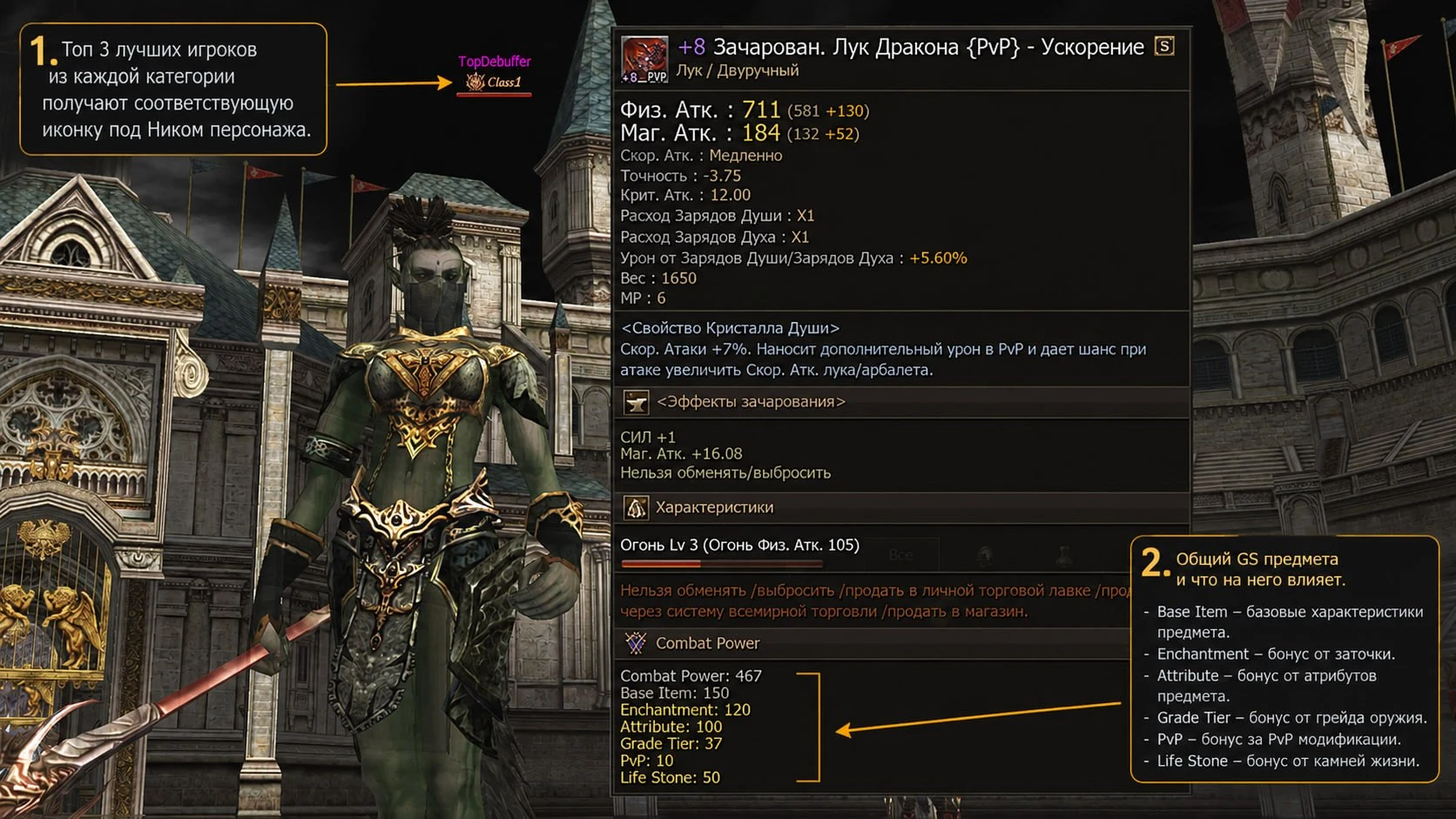
Total GS is affected by:
The item's base GS
Enchant level
Attribute enhancement
Item grade
PVP enhancement
Life stone augmentation
Item rarity
World trading
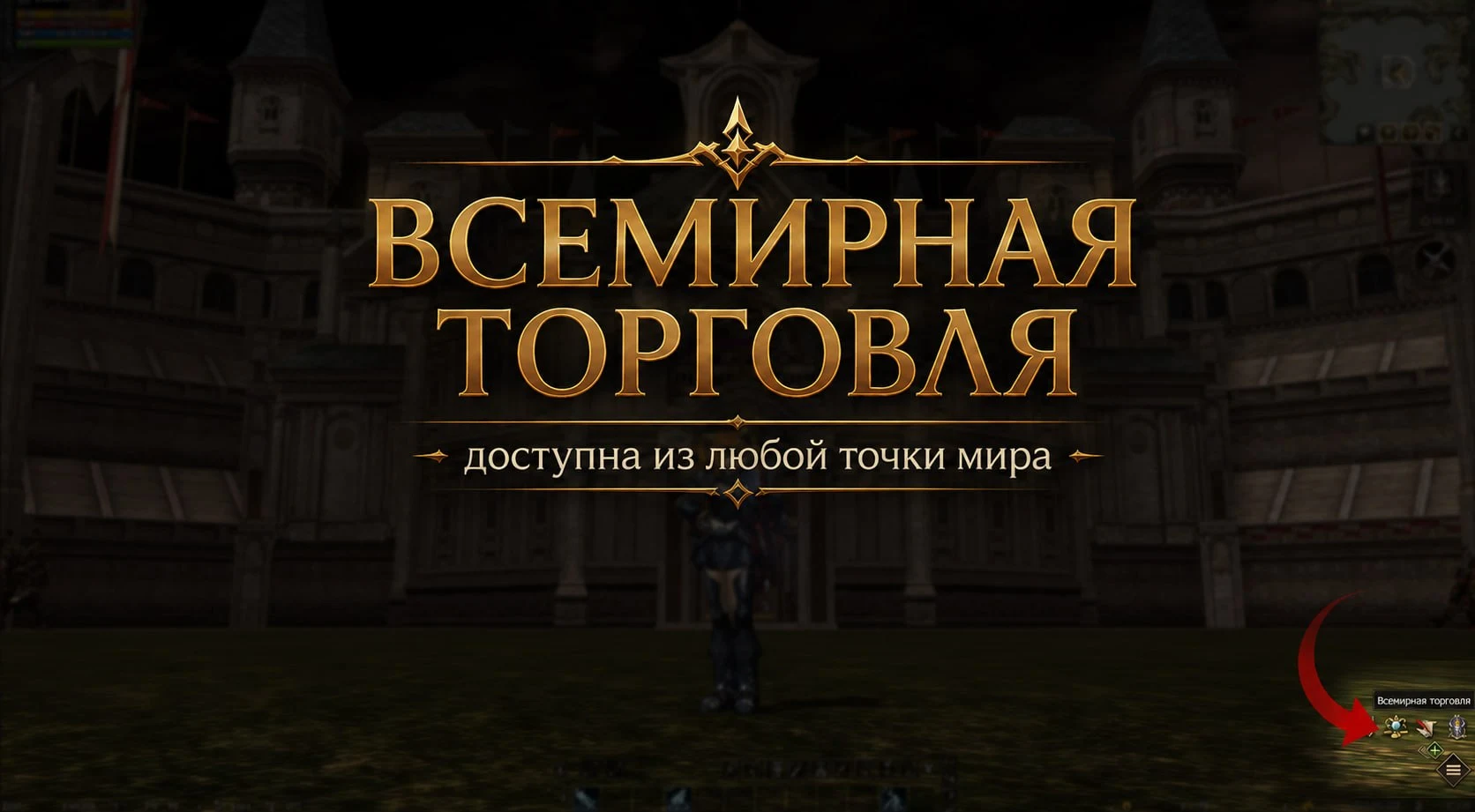
World trading is available from anywhere in the world. Open the trading menu by clicking the corresponding icon in the bottom right corner of the screen. Purchased items and proceeds from sales are delivered through in-game mail.
Buying items:
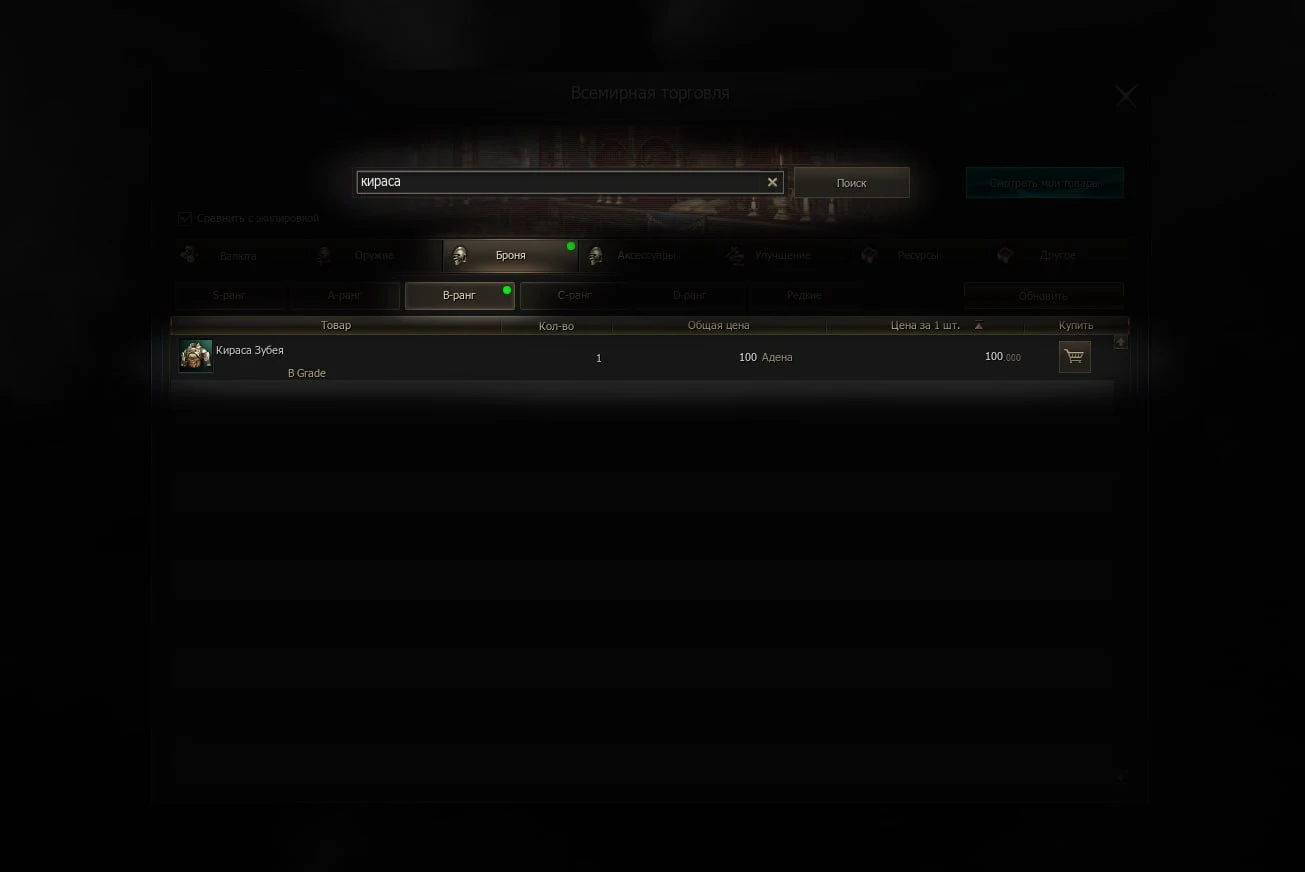
The “Purchases” section contains item categories and subcategories, making it easy to browse and quickly find the items you need.
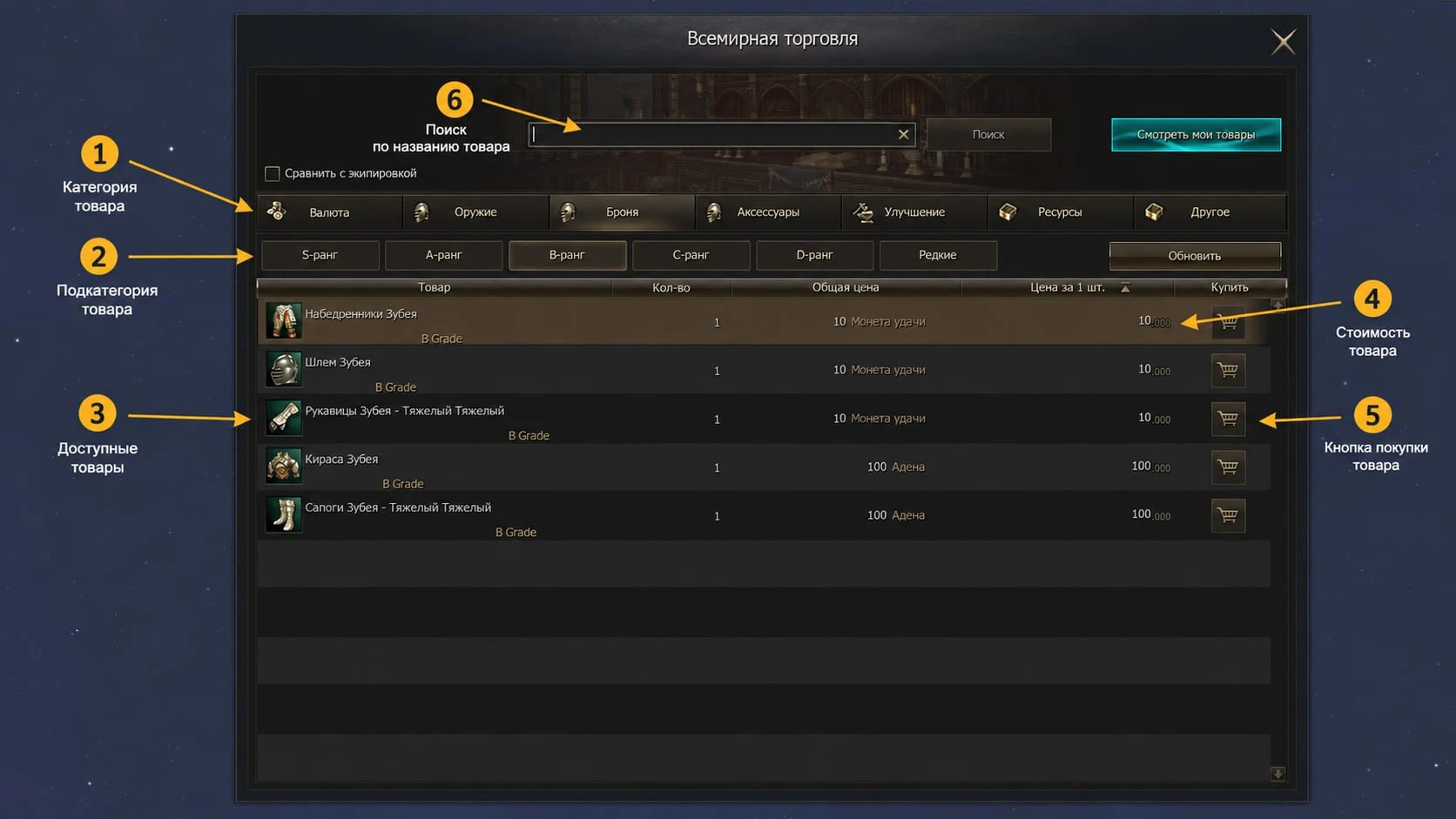
Search by item name, and the system will automatically highlight the corresponding category so you can quickly navigate to the item you need.
Selling items:
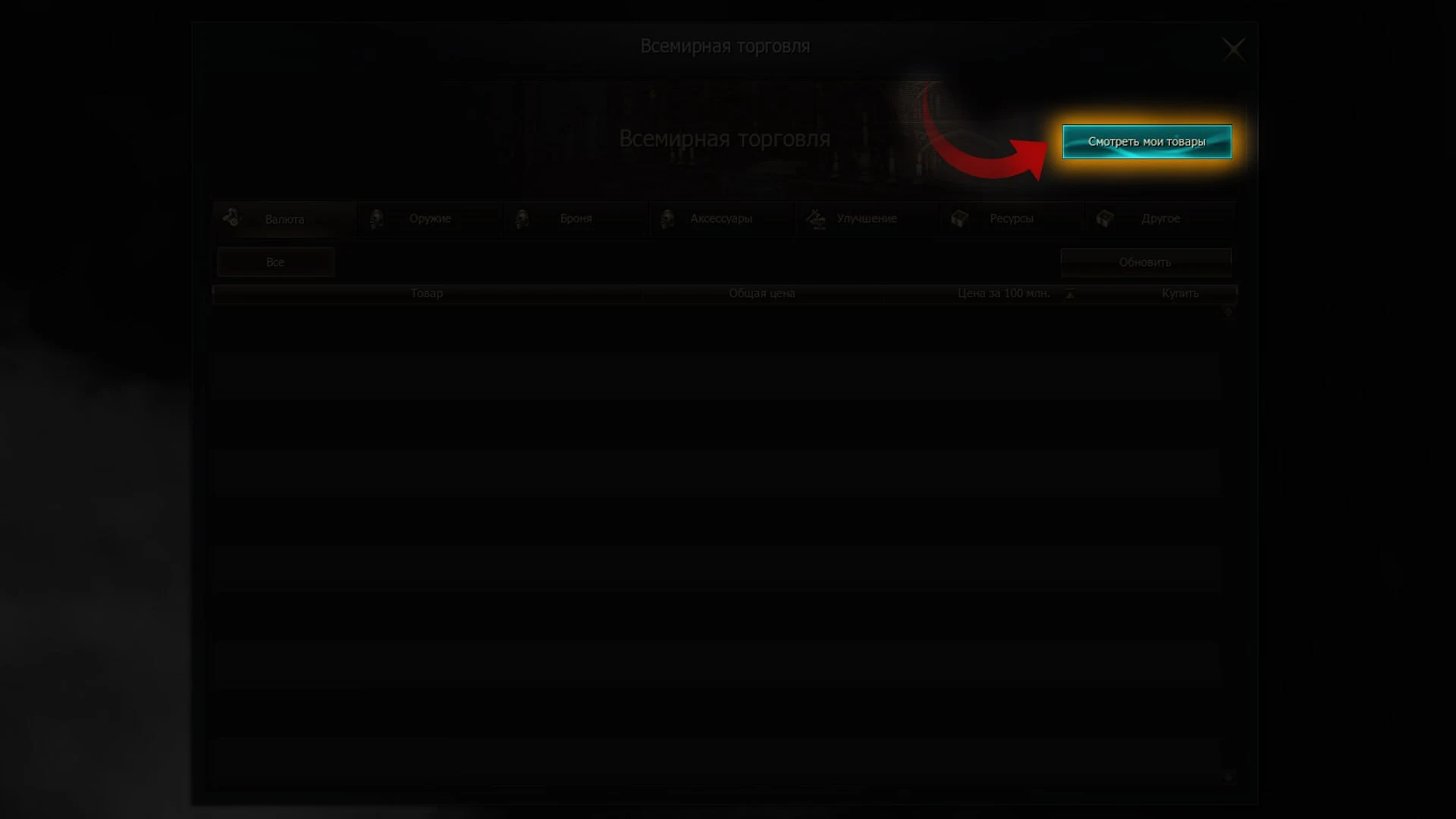
To open the item selling menu, click “View my items” in the top right corner.
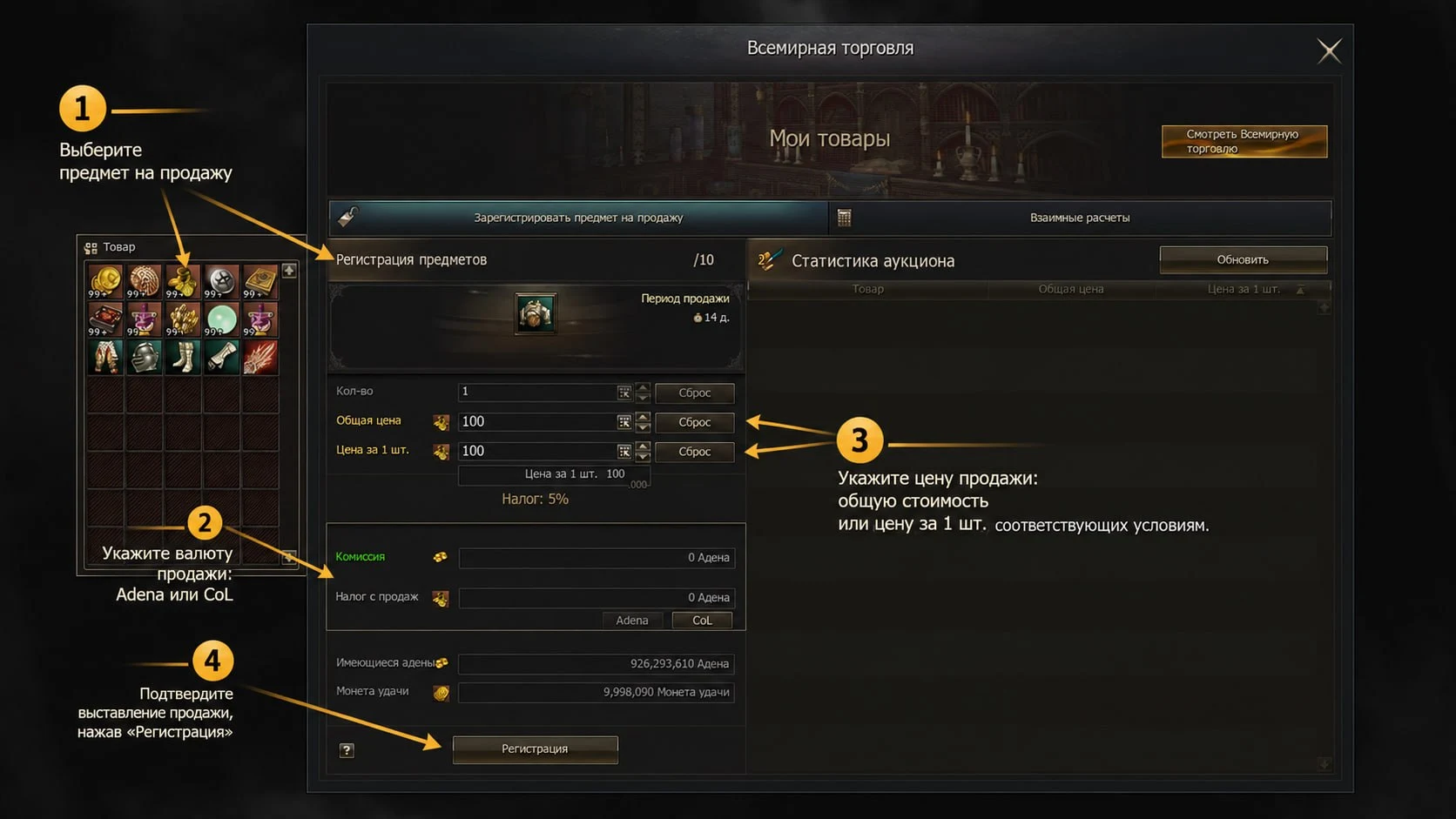
Select an item to sell, choose a currency (Adena or CoL), set the price, and confirm the listing.
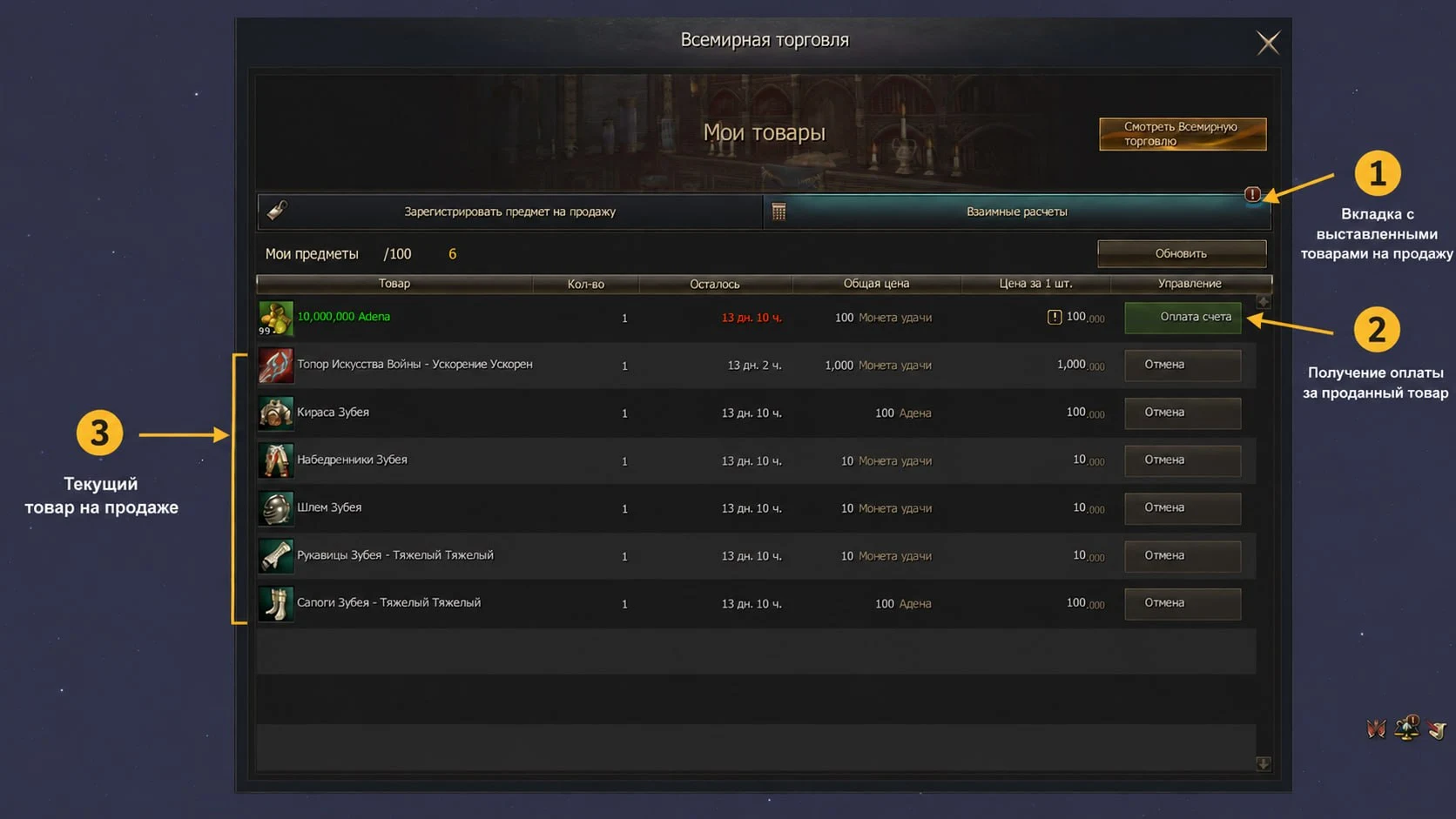
All your items are displayed in the “Settlements” section. Here you can collect payment for sold items or withdraw items that have not yet been sold.
World Olympiad
Registration is now available from anywhere in the world. The new interface displays brief statistics: the number of available matches, your current points, and your wins and losses.
Matches can only be watched from a peace zone.
World mail
In-game mail is now available from anywhere in the world. You can send and receive messages even during combat.
Sending mail:
Receiving mail:
Updated mail interface:
You can now add players to favorites for quick mailing and choose recipients from your friends list and clan members.
Automatic equipment enchanting
Select an item, open “Enchant Settings”, set the required parameters, and start the process.
Single enchant:
Select an item to enchant and click “Enchant”.
Mass enchanting:
Open the “Mass Enchant” section, select the items you want to improve, specify the enchant level, and confirm the start of enchanting.
Enchant settings:
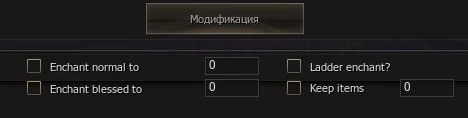
Enchant Normal — the level up to which an item will be enchanted using normal scrolls.
Enchant Blessed — the level up to which an item will be enchanted using blessed scrolls
Ladder Enchant — when multiple items are available, the system enchants each one by +1 in turn, then repeats the cycle until the specified level is reached.
Keep Items — the minimum number of items at which enchanting automatically stops.
Quick Life Stone augmentation
Click a Life Stone. In the menu that opens, select an item and click “Augment”
Applying the Life Stone effect:
After inserting a Life Stone, review the resulting effect. If you are satisfied with it, click “Apply new effects”. Otherwise, skip applying it to keep the previous effect.
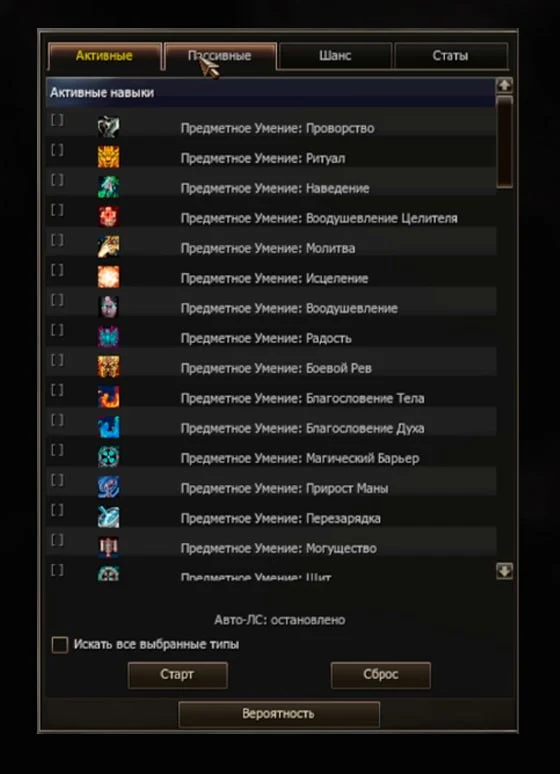
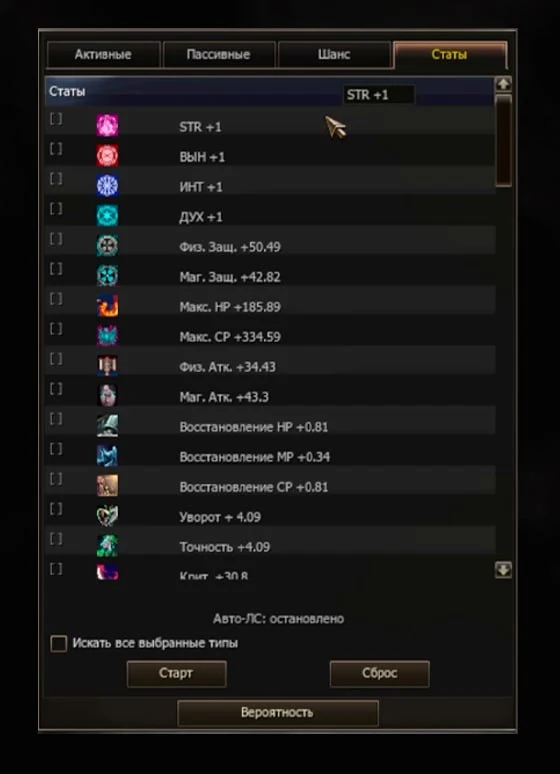
Automatic Life Stone augmentation:
Select the skills and/or stat you need in the “Active”, “Passive”, “Chance”, and “Stats” tabs, then click “Start”. Automatic augmentation will continue until one of the selected skills and/or stats is obtained.
Quick attribute enhancement
Click an attribute stone or crystal, select an item, and specify the number of stones or crystals to apply.
Automatic skill enchanting
In the skills window, click “Improve”, open the “Auto Enchant” section, choose a skill enchant route, and set the levels up to which normal and mastery books will be used. Then start the improvement process.
Improved subclass system
Subclass skills work on subclasses.
Quick switching
Press Alt+T. The available subclass icons are in the top right corner; select the subclass you need and confirm the change.
Tattoo profiles
The “Tattoo Set” button below the tattoo icons in your inventory lets you switch between profiles. There are 3 profiles, each of which can store its own combination of tattoos. You cannot switch during combat.
Applying tattoos
You can also apply tattoos directly from your inventory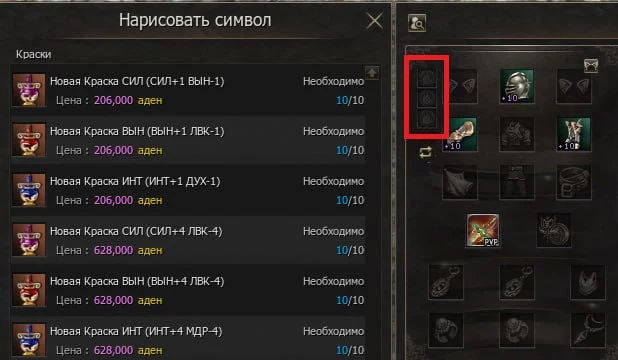
Buff / debuff settings
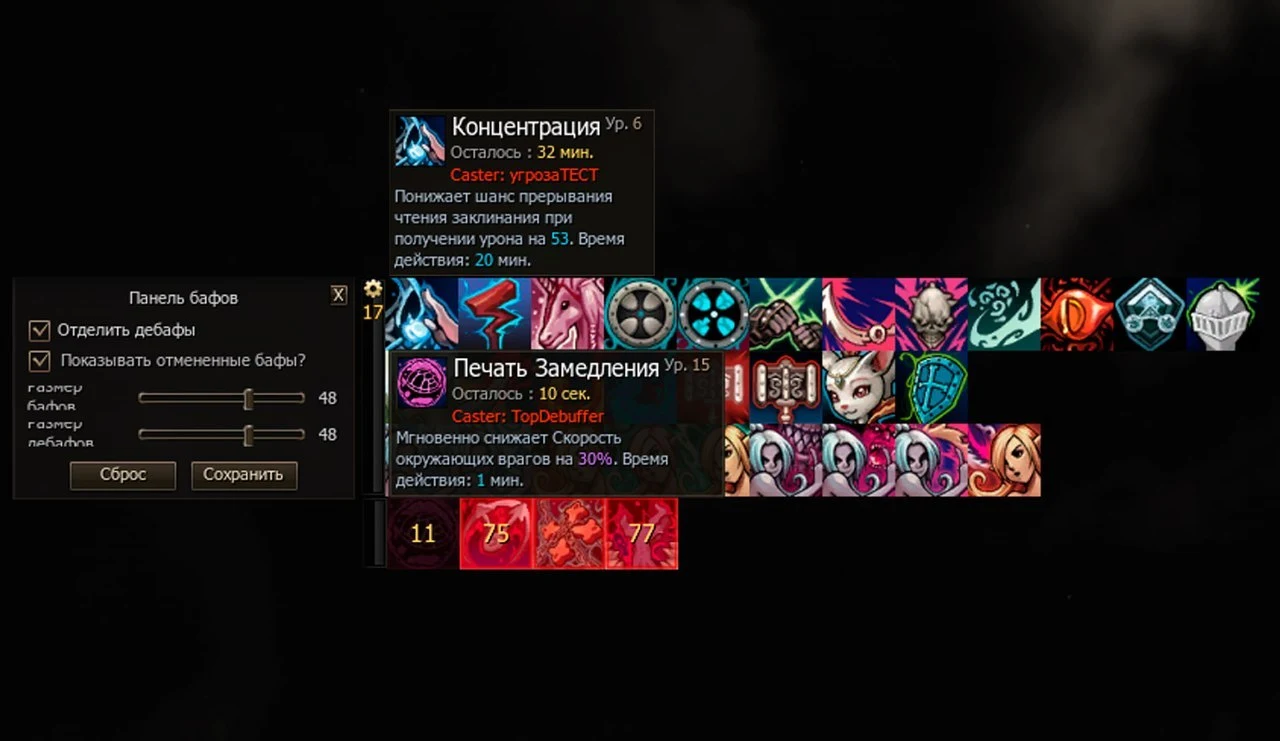
Flexible icon size and position settings have been added, along with detailed information about the caster.
Buff icon size settings:
Debuff icon size settings:
They can also be detached from the buff row and freely moved to any convenient position on the screen.
Informative buff / debuff description:
Hovering over a buff or debuff displays the name of the character who applied the effect in its description.
Monitoring party members' buffs
In the party window settings, you can choose key effects to display separately at the bottom of the window, regardless of the selected party effect display mode.
Highlighting party members
The party window settings include “Party Highlight”, which lets you choose one of the following colors: blue, light blue, green, orange, red, or purple.
Quick sale
Hold Ctrl+Alt and left-click an item.
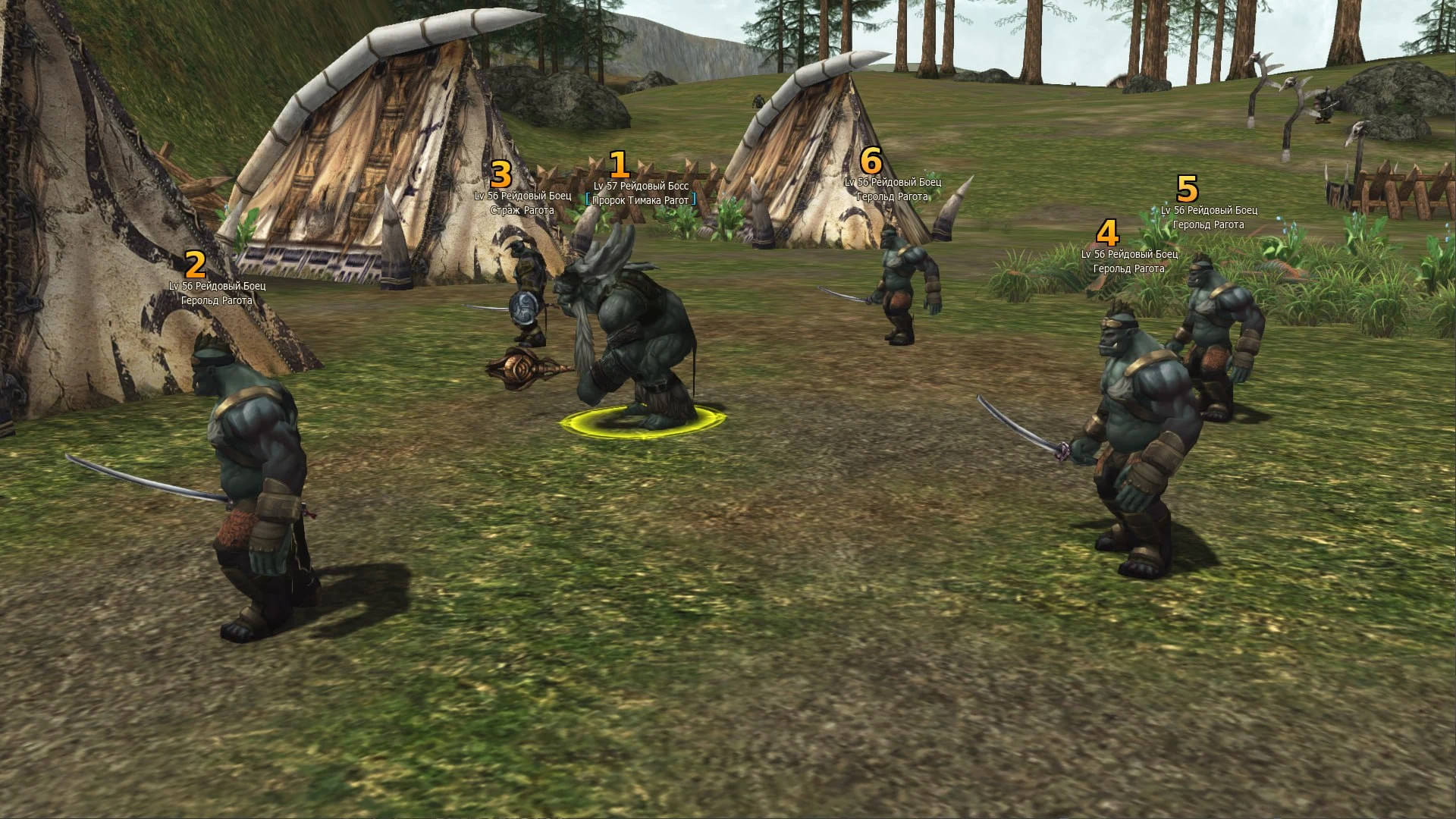
Special markers
A convenient tool for assigning priority targets to your party. Available in the actions menu.
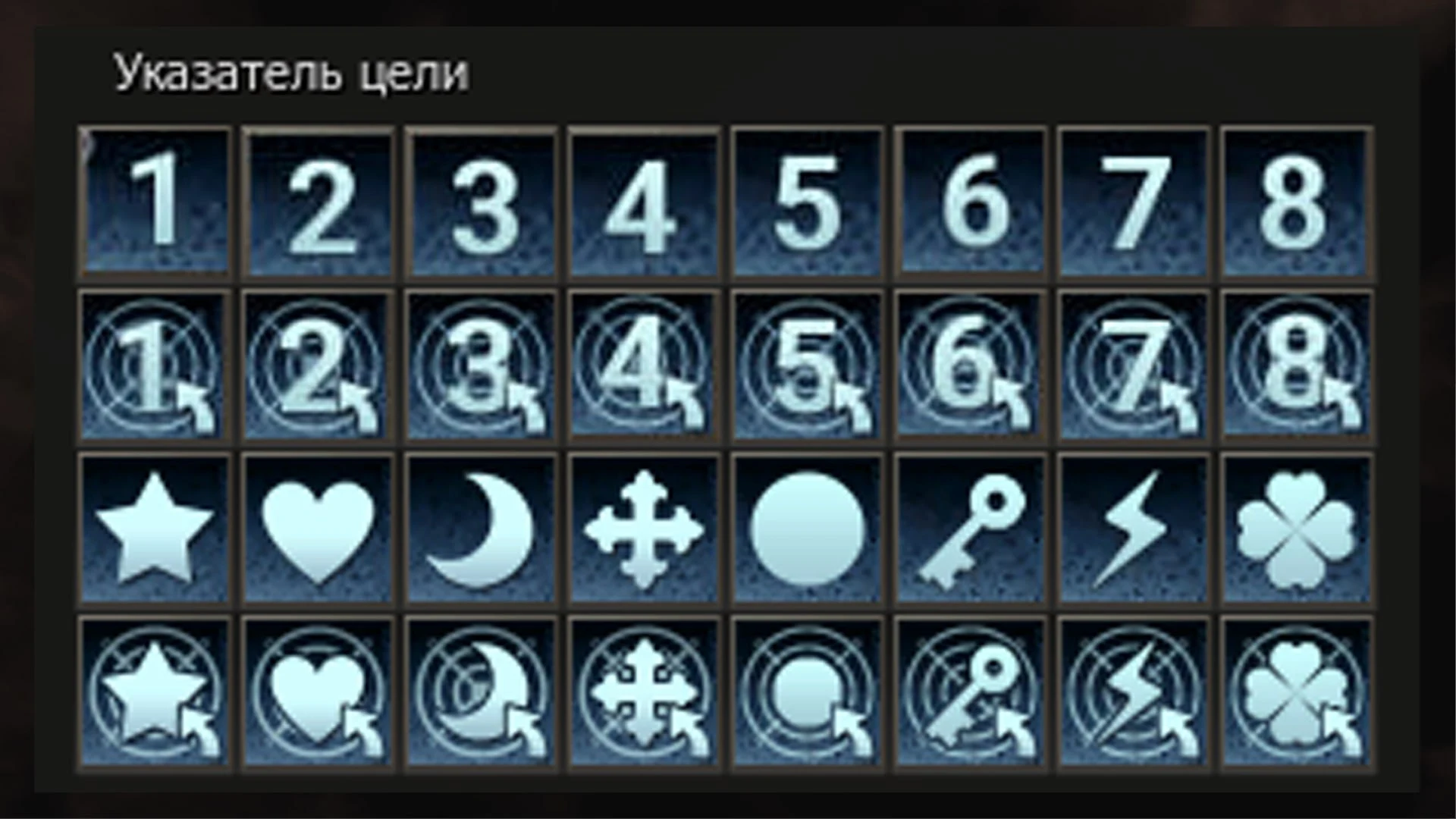
Markers can be placed on any targetable object: your own character, other players, monsters, bosses, NPCs, pets, and summons. Up to two different markers can be placed on one target at the same time.
Extended shortcut bar features
The main shortcut bar can expand to six rows, and two additional bars are available for quick access to skills and Life Stone effects.
Main bar
Additional bars
They open independently of the main bar and support three display modes: compact (4x3), horizontal, and vertical (12 slots).
Life Stone skill bar
Designed for weapons with active skills obtained through Life Stone augmentation. When you use an item skill from this bar, your character automatically equips the corresponding weapon and activates the skill.
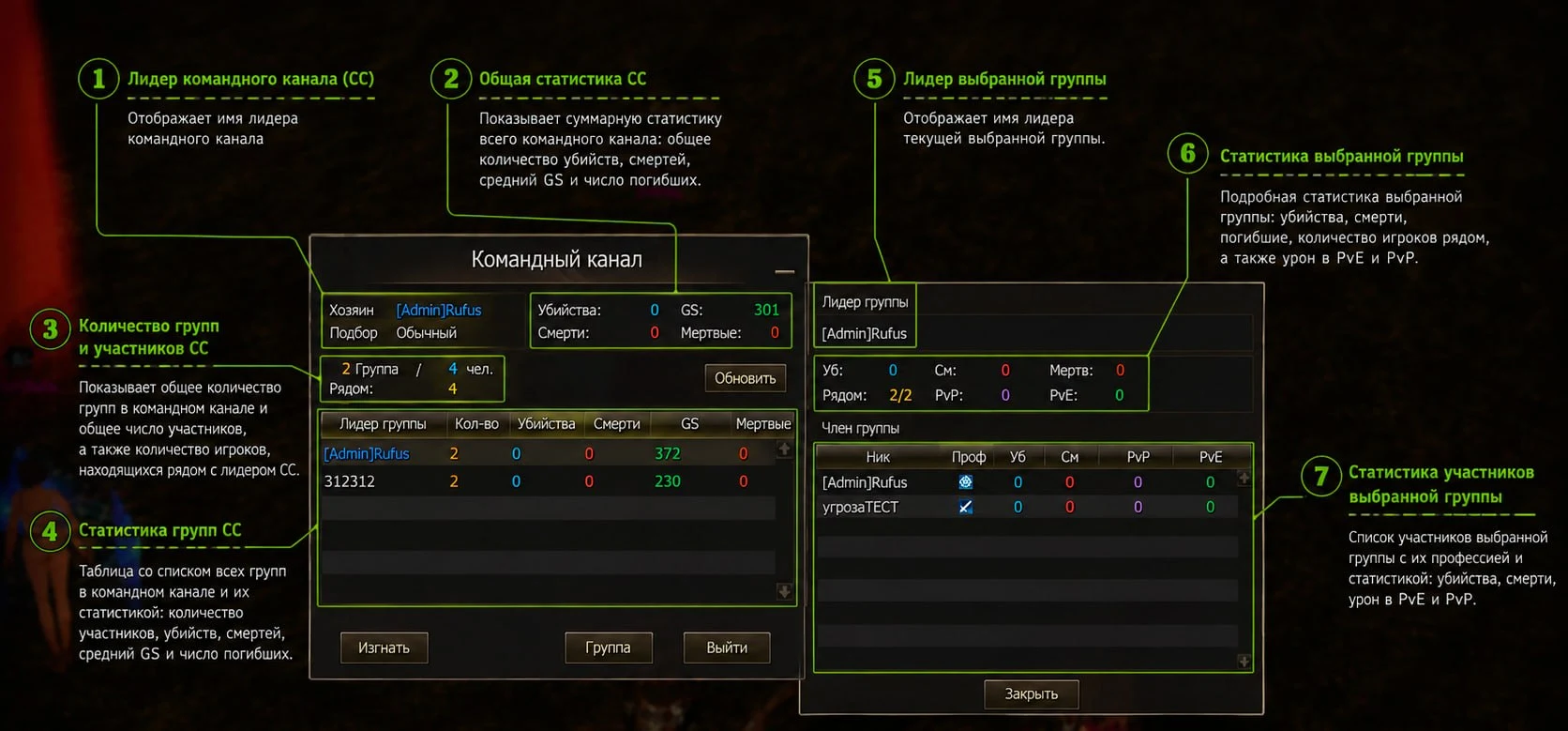
Improved command channel
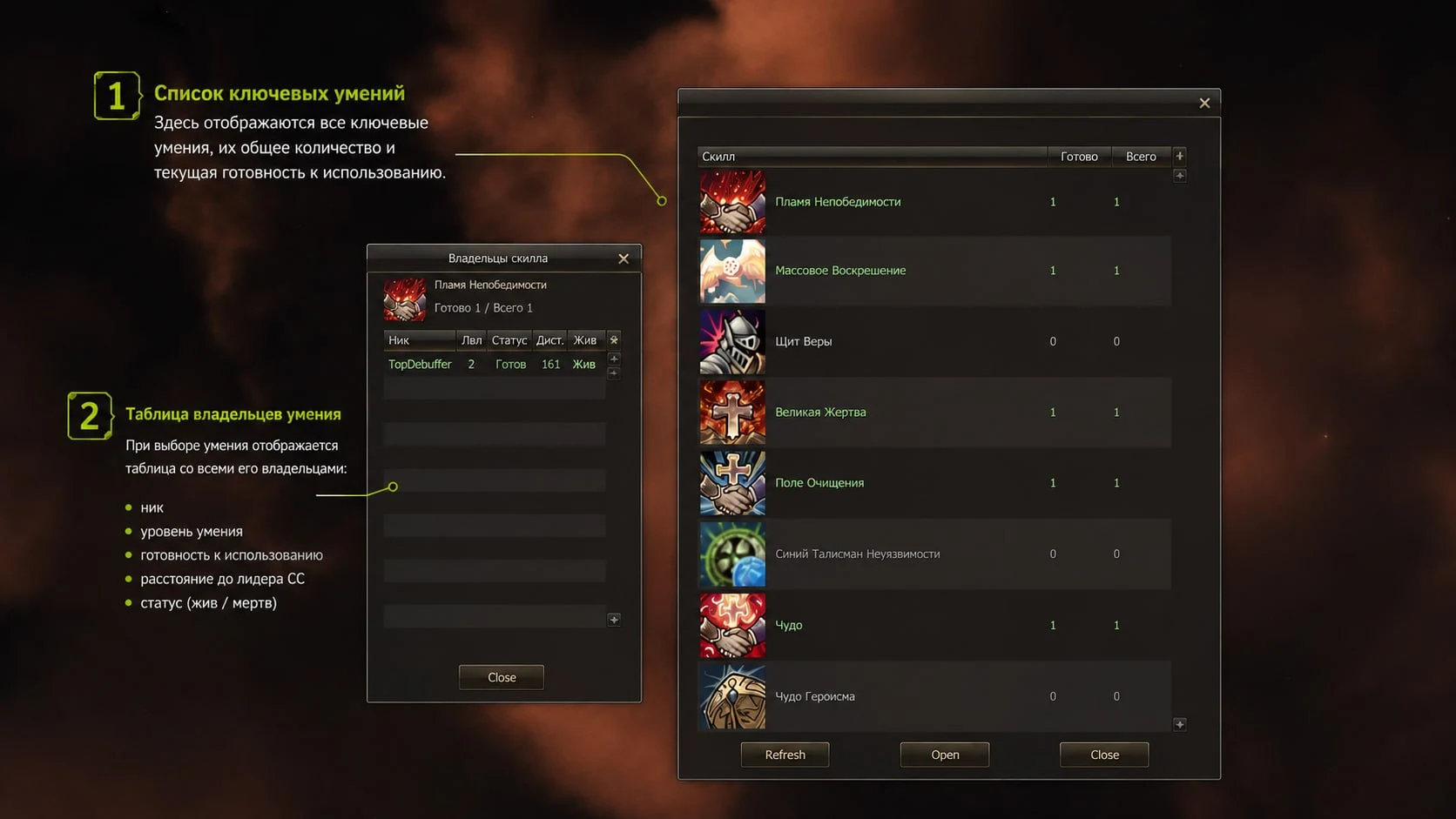
The CC leader is highlighted by a bright red beam. The information menu displays all parties and members with brief statistics, and the CC leader can track the availability, number, and cooldowns of key skills
CC leader highlight:
Highlighted by a red pillar of light, making the leader much easier to locate even in the largest battles.
Command channel interface:
This window displays general information and statistics for the command channel (CC), individual parties, and their members.
Command channel information:
Overall statistics for the entire CC
Number of parties and members
Statistics for each party
Statistics for each player
Tracking key skills:
The command channel (CC) leader has access to the “Skills” tab, which displays a list of key skills, their total number, and their current readiness for use.
Tracking individual skills:
Clicking a selected skill opens a window with detailed information about all players who have that skill.
Automatic potion use (ACP)
A separate potion and elixir bar is located on the right, above the main bar.
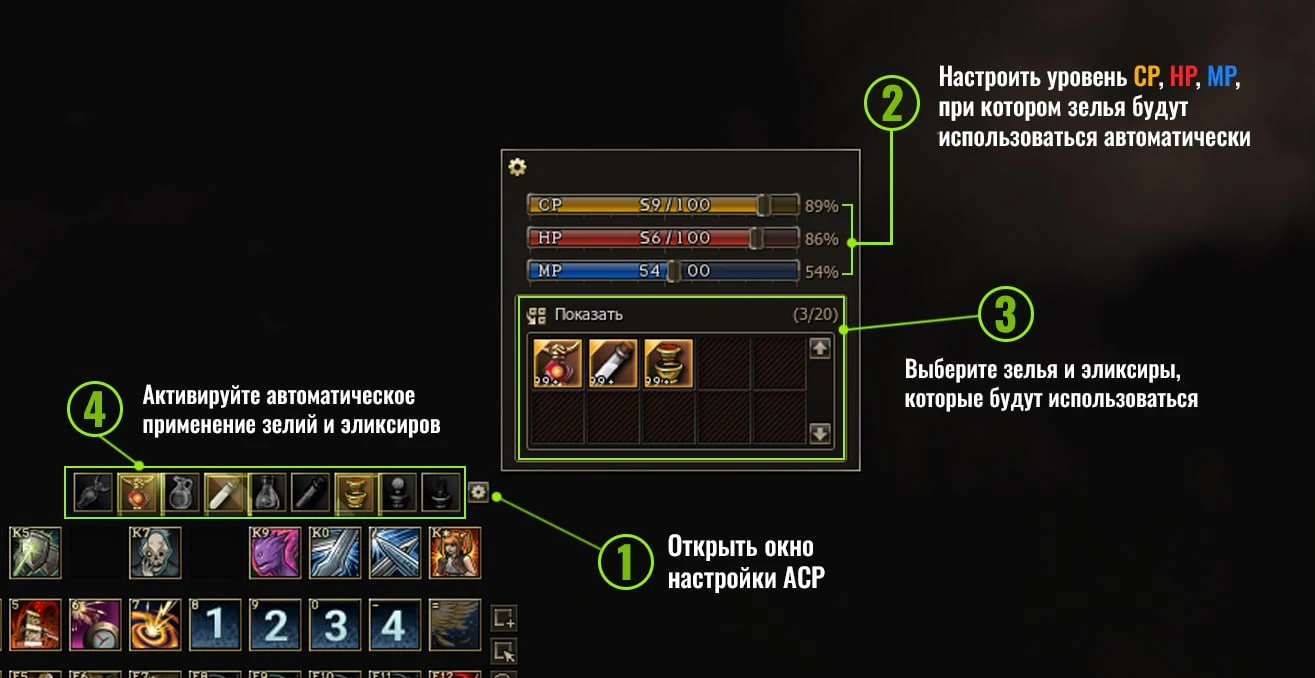
It lets you configure automatic use when CP, HP, and MP reach specified values.
Notifications during auto farming
A Telegram notification system has been implemented, allowing you to receive alerts about character death, attacks by another player, and prolonged inactivity during auto farming.
Connecting the bot:
Subscribe to the @emerlandCHAT channel
Open the @emerlandx50_bot bot
Enter your character's nickname and receive a code
Enter the game and type the .telegram command in chat
Enter the linking code in the window that opens
Enable the notifications you need
Voice chat
In-game voice chat has been added. It is available from level 20 with a Premium Account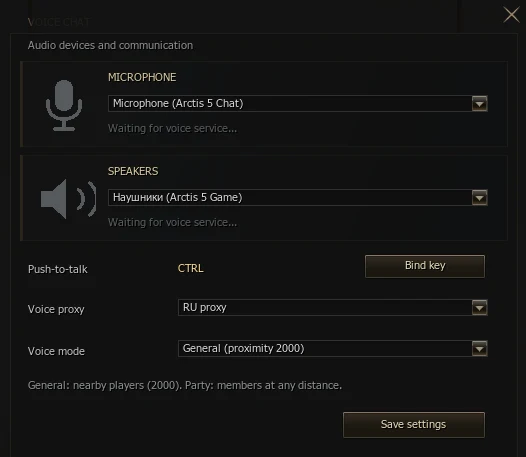
There are two modes
1) General. Within a radius of 2000; the farther away you are, the quieter the sound;
2) Party. Works throughout the world; you must be in a party to enable this mode;
Morvein's quests
You will find the NPC Morvein in every town. He offers a quest chain that starts at level 1.
He will guide you from level 1 to 85 and provide new quests in the future. 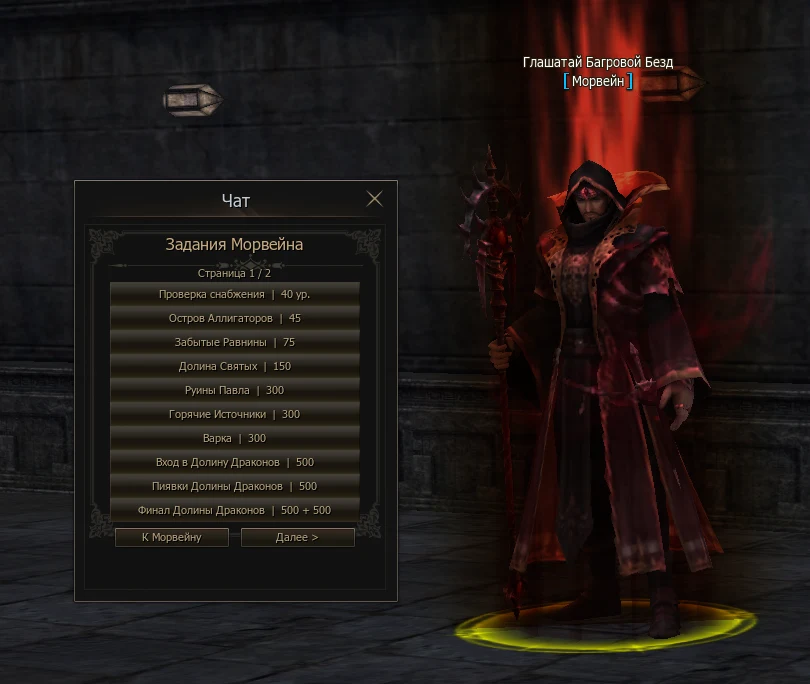
Secret Shop
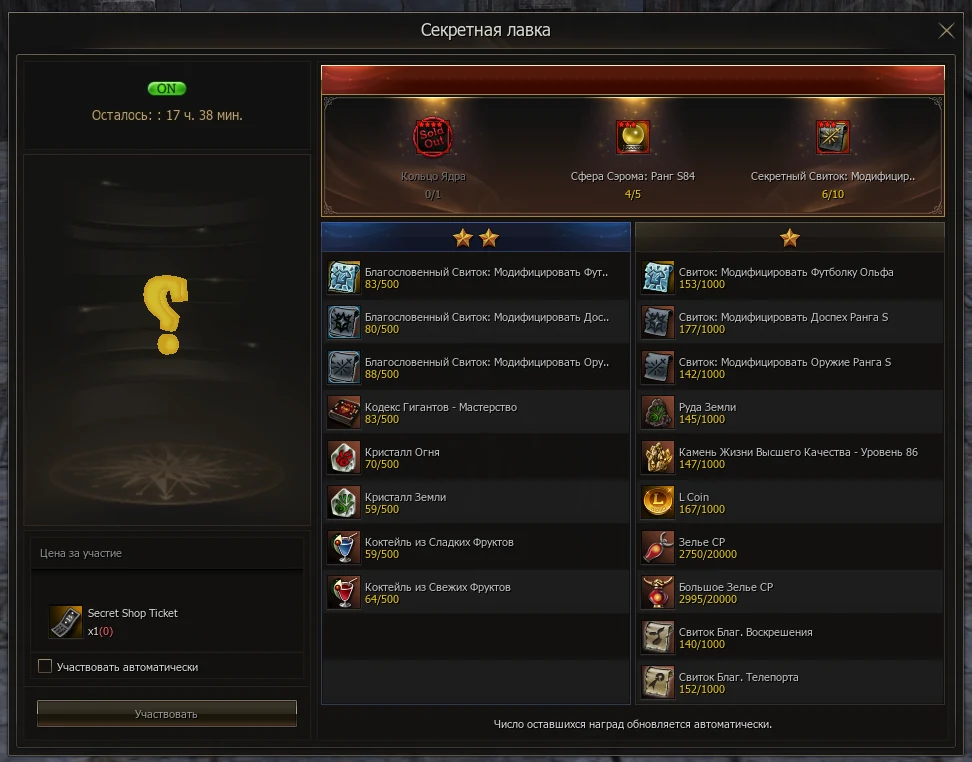
The “Secret Shop” opens on the server every day from 19:00 to 23:00. 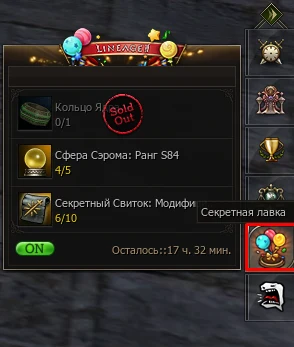
Use special tickets to take part in prize draws. The number of items in the shop is shared across the entire server. The prize list is refreshed every day.
The tickets are sold for Adena in a special section of the “L-Coin Shop”
The number of tickets available for purchase is limited by HWID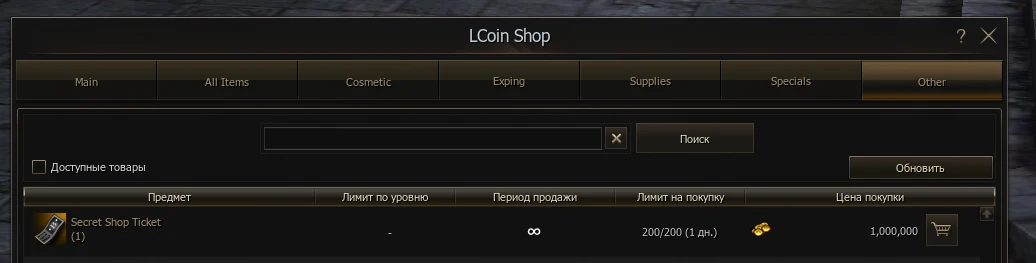
New locations
Emerald Square.
A location with various creatures, suitable for moderately geared players who can hunt solo or in small parties. For especially daring parties, there are large groups of creatures with different mechanics and excellent rewards.
In this location, you can obtain: Vorpal equipment, Vesper weapons, attribute stones and crystals, various resources, Blessed Scroll: Enchant Weapon S grade, Blessed Scroll: Enchant Armor S grade, and Life Stone.
Tantar.
A huge location featuring new dangerous creatures for parties and solo players, as well as unique mechanics that add variety to farming and battles for valuable spots. The location is active from 17:00 to 01:00.
In this location, you can obtain: Vorpal equipment, Vesper and Mid weapons, attribute stones and crystals, various resources, Blessed Scroll: Enchant Weapon S grade, Blessed Scroll: Enchant Armor S grade, and Life Stone.
General
 Noblesse Blessing now has a fixed casting time and can also be enchanted for increased casting range (+200).
Necromancer
 Corpse Burst now works without a corpse (by default on the Olympiad)
Destroyer
 A new toggle skill, Titans Cleave, has been added. While active, two-handed sword attacks hit 2 additional targets. Cannot be used on the Olympiad.
 Zealot - a PvP kill extends its duration by +5 seconds.
 Battle Sacrafice - reduces maximum HP to 30% and prevents HP from recovering above 30%. Lasts one minute and can be removed from yourself.
Grand Khavatari (Avatar) Battle Sacrafice - reduces maximum HP to 30% and prevents HP from recovering above 30%. Lasts one minute and can be removed from yourself. Zealot - a PvP kill extends its duration by +5 seconds.
Phantom Ranger
 A passive skill, Call of the Phantom Hunt, has been added. When using a bow/crossbow, it has a 5% chance to apply a triggered effect to all party members, increasing Critical Damage by 7% and Accuracy by 2 for 60 seconds. The skill can be enchanted to increase Critical Damage (up to 15%)
 Dead Eye can now be enchanted to reduce its penalty (down to 0%)
Silver Ranger
 Counter Rapid Shot can now be enchanted for PVE damage (up to 15%)
 Rapid Fire can now be enchanted to reduce its penalty (down to 0%)
Tanks (General)
 Combat Aura is now a toggle. While active, it increases party members' P. Atk., M. Atk., Atk. Spd., and Casting Spd. by 5% within a radius of 1500.
Paladin
 A new toggle skill, Provoke Aura, has been added. While active, it provokes monsters within a radius of 600 to attack you. Enchanting increases the number of targets it can provoke.
Temple Knight (Eva's Knight)
A new toggle skill, Provoke Aura, has been added. While active, it provokes monsters within a radius of 600 to attack you. Enchanting increases the number of targets it can provoke. A new triggered skill, Eva's Presence, has been added. When you take damage, it has a chance to apply an effect to you and your party that increases running speed and reduces incoming PvE damage. It has multiple enchant routes: activation chance or increased PvE damage. Buff application radius: 1000. Effect duration: 60 seconds.
Shillien Knight (Shilen's Knight)
A new toggle skill, Provoke Aura, has been added. While active, it provokes monsters within a radius of 600 to attack you. Enchanting increases the number of targets it can provoke.
Healers (General)
 Purify now also removes slow effects

 Chain Heal, Major Heal, and Resurrection can now be enchanted for increased casting range
 Mass Resurrection can now also resurrect party members who are not in your clan
 A new skill, Prophecy of Power, has been added for everyone who has Prophecy skills. For 5 minutes, it increases Max HP/MP/CP by + 10%, P. Atk. by +10%, P. Def. by +20%, M. Atk. and M. Def. by +20%, Atk. Spd. by +20%, Critical Rate and Critical Damage by +10%, Magic Critical Rate by +1%, Magic Critical Damage by +10%, and applies Speed -20%
Shillien Elder (Shilen's Elder)
 A new skill, Shilen's Saint's Blessing: Defense, has been added. It increases all party members' resistance to buff removal by 100 for 15 seconds. Can be enchanted for duration (each enchant adds +1 second). Learned at level 83. Cannot be used on the Olympiad.
 A new skill, Shilen's Saint's Blessing: Attack, has been added. Grants 30% life steal from offensive physical skills for 15 seconds. Can be enchanted for duration (each enchant adds +1 second). Learned at level 83. Cannot be used on the Olympiad.
Elven Elder (Eva's Elder)
 A new skill, Eva's Saint's Blessing: Attack, has been added. For 15 seconds, it increases all party members' M. Atk. by 5%, healing effectiveness by 20%, Casting Spd. by 25%, Magic Critical Rate by 25%, and reduces MP consumption by 30/60/90%. Can be enchanted for duration (each enchant adds +1 second). Learned at level 83. Cannot be used on the Olympiad.
 A new skill, Eva's Saint's Blessing: Defense, has been added. Reduces damage taken by party members by 30% for 15 seconds. Can be enchanted for duration (each enchant adds +1 second). Learned at level 83. Cannot be used on the Olympiad.
Prophet (Preacher)
 A new skill, Party Immunity, has been added. Makes party members immune to debuff effects of spells for 30 seconds. Cannot be used on the Olympiad.
Inspector
 A new toggle skill, Lesser Appetite for Destruction, has been added. While active, it increases P. Atk., physical attack power and chance by 5% for all party members within a radius of 1500.
 A new toggle skill, Lesser Protection Instinct, has been added. While active, it increases P. Def. by 180 and M. Def. by 135 for all party members within a radius of 1500.
 A new toggle skill, Lesser Magic Impulse, has been added. While active, it increases M. Atk. by 7.5%, Casting Spd. by 3%, and Magic Critical Damage by 15% for all party members within a radius of 1500.
 Prahnah has been added
  The passive skill Crossbow Mastery has been added
Dagger users (General)
 A new skill, Fate of Adventurer, has been added. Attacks enemies around the character with 8234 Power added to P. Atk. Range: 300. No selected target is required. Lethal, half-lethal, critical hits, and over-hit are possible. Base success chance: 40%. Requires a dagger or dual daggers. Cooldown: 5 sec. Cannot be used on the Olympiad.
Bards (General)
 Combo dances/songs have been added
General
All epic bosses are level 85 and have up-to-date drops (depending on the stage)
Monday
Ant Queen - at 21:00
Core – at 21:15
Tuesday
Orfen – at 21:00
Frintezza – at 21:15
Wednesday
Baium – at 21:00
Zaken – at 21:15
Thursday
Freya – at 21:00
Friday (second week)
Antharas – at 21:00
Valakas – at 21:15
Epic jewelry changes
Two identical low-tier epic jewelry items can be exchanged for one upgraded item
Description
Standard Ant Queen
 Poison Resistance +30%, Poison Chance +30%, Hold Resistance +20%, Hold Chance +20%,
Accuracy +2, Critical Damage +15%
Level 2 Ant Queen
 Poison Resistance +30%, Poison Chance +30%, Hold Resistance +30%, Hold Chance +30%,
Accuracy +4, Critical Damage +17%
Standard Orfen
 Bleed Resistance +20%, Bleed Chance +20%, Received Healing Effectiveness +6%
Level 2 Orfen
 Bleed Resistance +30%, Bleed Chance +30%, Received Healing Effectiveness +10%, Mental Attack Resistance +30%, Mental Attack Chance +30%, MP Consumption - 10%, Max MP/CP/HP + 10%
Standard Core
 Poison Resistance +20%, Poison Chance +20%, Accuracy +1, P. Def. and M. Def. +5%
Level 2 Core
 Poison Resistance +20%, Poison Chance +20%, Accuracy and Evasion +4, P. Def. and M. Def. +7%
* Gear Score -50% compared to the original jewelry
Olympiad settings
The Olympiad takes place on Friday and Saturday from 18:00 to 00:00
On Sunday at 12:00 server time, Olympiad winners receive Hero status
A maximum of 70 matches can be played in total during a week of battles.
The minimum number of participants required to start a wave is 11.
The maximum number of points a player can gain/lose per match is 5
Match duration - 5 minutes.
The minimum number of matches required to receive point rewards is 15
The minimum number of wins required to become a Hero is 1
Number of Olympiad Token awarded per 1 Olympiad point - 1000
Changes on our server
Starting points have been increased to 50, with another 10 awarded every day
Participants are notified of their opponent's class before the match begins
An arena teleport confirmation request is sent (so you do not have to wait for the 2-minute countdown)
The wait before teleporting back to town after a match has been reduced to 10 seconds
All cosmetic skins are disabled for Olympiad players when they teleport to the arena
An Olympiad win now awards 600 Olympiad Token, and a loss awards 200 Olympiad Token
Completing the task for 10 wins awards Boss Soul Fragments
Opening Olympiad chests awards 5 Coin Of Luck and 1000 Olympiad Token each
Two game windows with the same 1 HWID cannot register
Enchant limits have been added to the Olympiad (Weapons +8, Armor and Jewelry +6)
Description and rewards:
An automatic event takes place on the server every hour. All participants receive a special Event Box with a random reward. You can track the schedule in Alt+B.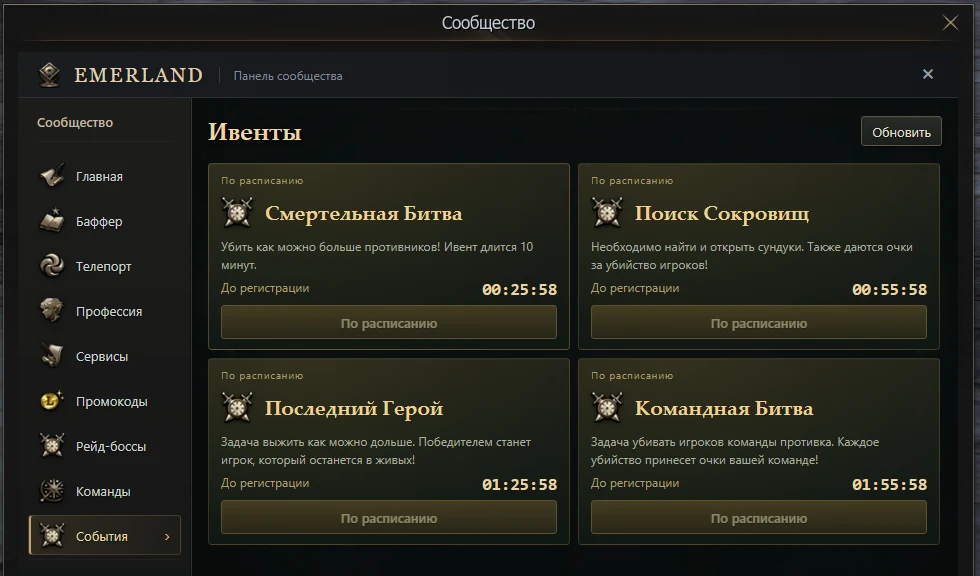
Team vs Team
Participants are divided into two teams. The objective is to kill as many members of the opposing team as possible during the event.
The contribution system is enabled.
Capture the Flag
Participants are divided into two teams. The objective is to capture as many flags as possible within the time limit.
The contribution system is enabled.
Last Hero (free-for-all)
All participants enter an arena where everyone fights for themselves. The last surviving participant wins the event. When players teleport to the event, their nicknames, appearances, clans, and titles are hidden.
The contribution system is disabled.
Capture of the Fort
Participants are divided into two teams. The objective is to deal as much damage as possible to the opposing team's crystal during the event.
The contribution system is enabled.
Domination
Participants are divided into two teams. The objective is to capture and hold control points during the event. The team that earns the most points during the event wins.
The contribution system is enabled.
Team vs Team (rounds)
Participants are divided into two teams. The objective is to kill as many members of the opposing team as possible during the event. After dying, players do not resurrect until the next round. The event lasts 3 rounds of 2 minutes each.
The contribution system is disabled.
Treasure Hunt (free-for-all)
All participants enter an arena where everyone fights for themselves. You need to find and open chests on the map. Points are also awarded for killing players.
The contribution system is disabled.
Other:
Stages: Event rewards increase depending on the stage
Balancer: When assigning players to event parties, their classes are taken into account (to avoid situations where one party has 3 Bishops and 2 buffers while another consists entirely of damage dealers), along with their characters' GS
Anti-AFK system: Characters who do not deal damage or move, or who follow someone for more than 60 seconds, will be kicked from the event
Event registration is available from level 50.
Contribution system: Performing certain actions during events awards contribution points, for example:
For every 1000 HP or MP restored to a party member (does not work on yourself)
For each buff applied to party members (the ally must make a kill while under your buff, and you must be within a radius of 2000 of them)
For each debuff applied (the opponent must die while affected by it)
For kills and damage dealt
For damage taken (for tanks)
For assists (damage you dealt to an opponent who was finished off by another player counts)
For using certain skills (such as aggression or mana burn)
Morvein — guide
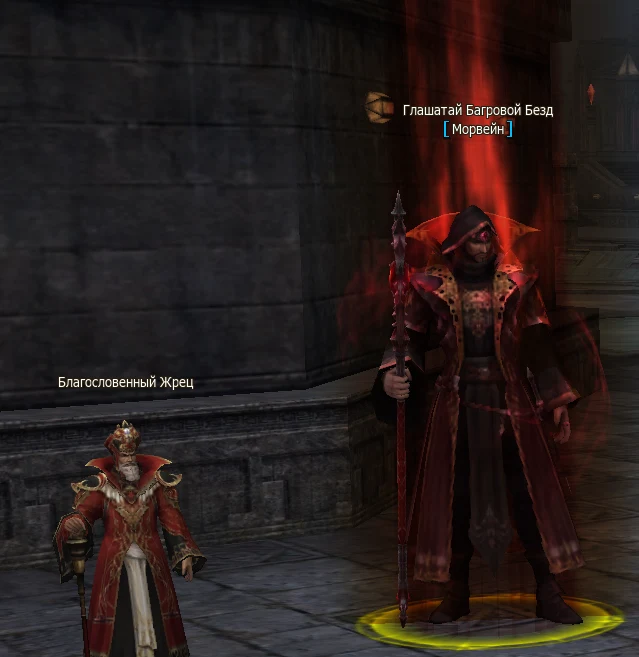
Morvein, Herald of the Crimson Abyss, offers quests for character progression, monster hunting, and participation in world boss battles. His tasks will help you earn levels, Adena, coins, and Morvein's Crimson Tickets.
Morvein can be found near Kamael Village, as well as in Giran, Aden, Oren, Dion, Heine, Gludio, Goddard, Schuttgart, and Rune. Open his “Quests” section: the first page covers starting out and progression, the second covers hunting at level 85, and the third covers world bosses.
Rewards you can obtain
 Level increase. Starting quests raise you to the specified level if your character has not yet reached it.
 Adena. From 2 to 14 million for individual early hunting quests.
 L Coin. 200 for early hunting; the amount increases in level 85 quests.
 Morvein's Crimson Tickets. For hunting and participation in world boss kills.
 Emerland Starter Chest. One chest with a choice of one of three starter sets.
First task: Supply Check
Accept Morvein's task, complete Marcella's quest “Supply Check” and return to Morvein. The reward is a level increase to level 40 and one Emerland Starter Chest. If you are already level 40 or above, your level remains the same, but you still receive the chest. Open the chest and choose one of the three available sets.
Hunting and character progression
The list specifies the minimum level required to accept each quest. For each of the nine tasks you also receive 200 L Coin. The increase to the specified level only applies if your character is still below it. The three Dragon Valley quests award tickets and coins, without a separate level or Adena reward.
Hunting on Alligator Island — from level 40. Objective: 45 monsters.
Reward: increase to level 55, 2 000 000 Adena, 1 ticket, 200 L Coin.
Hunting in Forsaken Plains — from level 50. Objective: 75 monsters.
Reward: increase to level 62, 4 000 000 Adena, 1 ticket, 200 L Coin.
Hunting in the Valley of Saints — from level 60. Objective: 150 monsters.
Reward: increase to level 72, 6 000 000 Adena, 1 ticket, 200 L Coin.
Hunting in Pavel Ruins — from level 66. Objective: 300 golems.
Reward: increase to level 76, 9 000 000 Adena, 1 ticket, 200 L Coin.
Hunting in Hot Springs — from level 72. Objective: 300 monsters.
Reward: increase to level 79, 12 000 000 Adena, 1 ticket, 200 L Coin.
Hunting in Varka — from level 76. Objective: 300 Varka Silenos.
Reward: increase to level 81, 14 000 000 Adena, 2 tickets, 200 L Coin.
Hunting at the Dragon Valley entrance — from level 78. Objective: 500 Drakos and Valley Necromancers.
Reward: 2 tickets, 200 L Coin.
Hunting leeches in Dragon Valley — from level 80. Objective: 500 bloodsucking parasites along the road from the entrance to Antharas' Lair.
Reward: 2 tickets, 200 L Coin.
Hunting in northern and southern Dragon Valley — from level 83. Objective: 500 Drakos and neighboring creatures in the north, then 500 scorpions in the south.
Reward: 2 tickets, 200 L Coin.
The first five hunts become available according to level. Varka requires completing Hot Springs. Then complete the Dragon Valley entrance, leeches, and northern and southern hunts in sequence. Completing the final Valley quest unlocks Antharas' Lair.
Continuation: quests for level 85
All the following tasks are available from level 85 and require completion of the previous stage. Complete them in the specified order. The rewards here are Morvein's Crimson Tickets and L Coin; no separate level increase or Adena is awarded.
Antharas' Lair. Objective: 3 000 monsters, excluding the Drake group and Bloody Kariks, Kariness, and Berserkers.
Reward: 9 tickets and 900 L Coin.
Antharas' Lair 2. Objective: 3 500 Drake Leaders, Commanders, Mages, or Scouts.
Reward: 10 tickets and 990 L Coin.
Antharas' Lair 3. Objective: 4 000 Bloody Kariks, Kariness, or Berserkers.
Reward: 11 tickets and 1 089 L Coin.
Seed of Annihilation. Objective: 1 500 monsters in the Seed of Annihilation.
Reward: 10 tickets and 1 000 L Coin.
Emerald Square 1. Objective: 4 500 Cursed Head Maids, Cursed Gardeners, Jealous Maids, or Minotaur Healers.
Reward: 11 tickets and 1 100 L Coin.
Emerald Square 2. Objective: 5 000 Other Dimension Archons, Otherworldly Archons, Astatine Chief Gatekeepers, or Other Dimension Marshals.
Reward: 12 tickets and 1 210 L Coin.
Tantar 1. Objective: 5 500 Minotaurs or Crystal Guards.
Reward: 13 tickets and 1 331 L Coin.
Tantar 2. Objective: 20 000 Amden Orcs, Zophans, Zophan Engineers, Nerva Orc Merchants, or Kunda Lords.
Reward: 14 tickets and 1 464 L Coin.
Final Clear-Out. Objective: 40 000 monsters from the Emerald Square 2 or Tantar 2 quests.
Reward: 18 tickets and 1 903 L Coin.
Only suitable quest targets count. Hunting in instances does not count for Antharas' Lair, Emerald Square, Tantar, and Final Clear-Out. Watch the task counter to make sure your chosen monsters provide progress.
World boss quests
The third page contains eight separate tasks: Ant Queen, Core, Orfen, World Zaken, World Freya, World Frintezza, Antharas, and Valakas. Each boss awards 5 Morvein's Crimson Tickets, all eight award 40 tickets.
Accept the relevant quest in advance, deal damage to the boss, and wait for it to die. Pet or servitor damage counts for the owner. The last hit is not required: players who dealt damage and have the task active receive credit. Simply being in a party is not enough. Killing a boss in an instance does not count.
Claiming rewards and tickets
Each task can be completed once per character. After completing the objective, return to Morvein and click “Claim reward”. The completed quest is marked in the list, and the next stage becomes available after you claim the reward for the previous one.
In Morvein's “Shop” section, you can buy:
You may find useful: Quick start